

Monthly milk billing costs Saeed most of his Sunday evenings. He runs a home-delivery milk round in Muscat with close to 180 households on his list. Every customer’s order moves daily. So by month’s end, his notebook looks nothing like a clean subscription log.
He isn’t alone. Most new operators learn billing the hard way, one disputed invoice at a time, and quickly discover that these financial arguments are a primary reason milk delivery customers leave.
This guide walks through that same calculation, step by step. Then it covers skipped days, mid-cycle rate changes, and deposits. It also covers region-specific examples for the GCC and Africa.
The later sections cover a faster month-end close. Then they walk through a plain comparison between manual and automated billing. Each idea comes with a worked example. So you can check it against your own numbers.
What Is Monthly Milk Billing?
Monthly milk billing is the process of turning a month of changing daily deliveries into one accurate bill per customer. It covers the quantity delivered, any price changes, and anything carried over from before. Instead of a flat subscription fee, the total changes every month because the deliveries themselves change every day.
Why Month-End Milk Billing Takes So Long
Most billing delays trace back to one root problem. The invoice must match what the rider actually delivered, not what the plan expected. So small mismatches pile up. One missed skip day causes a dispute. Then a rate change goes unlogged on the right date. Or a deposit gets folded into the delivery total instead of kept separate. Each one is small. Yet together they add up to an evening lost untangling one invoice.
How to Calculate a Monthly Milk Bill, Step by Step
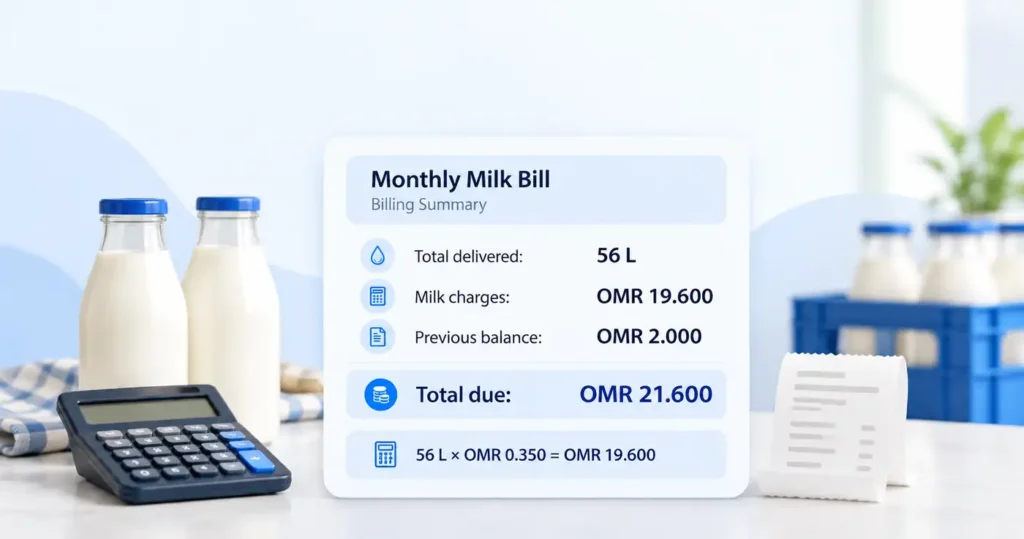
The core formula is simple: multiply the quantity delivered each day by that day’s rate. Then add every day in the billing cycle together. Still, the complexity comes from the variables inside that formula. Quantity changes daily, skipped days drop out, and the rate itself can shift mid-cycle.
Here’s how that plays out for one of Saeed’s customers over a 30-day cycle.
| Item | Detail | Amount |
| Daily order | 2 liters | N/A |
| Delivery days | 30 days minus 3 skipped | 27 days |
| Extra liters requested | One-off top-up | +2 liters |
| Total delivered | 27 × 2 + 2 | 56 liters |
| Rate | OMR 0.350 per liter | OMR 19.60 |
| Previous balance | Carried from last month | OMR 2.000 |
| Total due | OMR 21.60 |
That total only works because every row ties back to an actual delivery record. Instead of an assumption made at month’s end, each number traces to something that actually happened.
Handling Milk Billing Adjustments
Three adjustments account for nearly every billing dispute.
Skipped and Paused Deliveries
A skipped day simply drops out of the total; it isn’t billed, and it shouldn’t be. Instead, the real challenge is logging the skip on its actual date, not estimating it later.
Extra Quantities and Mid-Cycle Price Changes
An extra liter on a single day adds to that day’s line, nothing more. A rate change partway through the cycle is trickier. Stripe’s billing documentation describes the same split for subscription changes. It credits the unused time at the old rate. Then it charges the remaining time at the new one. Milk billing works the same way, day by day instead of by the second.
Deposits and Previous Balances
Bottle or crate deposits aren’t part of the delivery bill. They sit in a separate running balance until the container comes back. Previous balances carry forward as their own line too, never blended into this month’s liters.
Monthly Milk Billing in GCC and African Markets
GCC households often pay in AED or SAR for a recurring daily or weekly order. In fact, deposits for returnable bottles get handled much like Saeed’s. Meanwhile, smaller distributors in Kenya and Nigeria often run on a credit balance in KES or NGN instead.
Once due, they typically settle that balance at pickup or on a fixed collection day. Still, neither approach is a universal standard. Local practice varies by city, not just by country.
How to Close Monthly Milk Billing Faster
A faster month-end close follows the same five steps every time.
- Verify every delivery against the route record, not memory.
- Resolve open exceptions: skips, pauses, and extra orders.
- Reconcile any previous balance before adding this month’s total.
- Generate each invoice from the actual delivery record, not an estimate.
- Review and send bills on the same date every month, so customers expect it.
Doing these in order removes most of the back-and-forth that drags billing into the following week.
Manual vs. Automated Monthly Milk Billing

Spreadsheets can handle monthly milk billing. But they make every adjustment someone has to do manually.
| Task | Manual (Spreadsheet) | Automated |
| Daily quantity tracking | Entered by hand, per customer | Logged from each delivery |
| Skipped days | Easy to miss or forget | Reflected automatically |
| Mid-cycle rate changes | Needs a manual split calculation | Applied from the effective date |
| Deposits vs. delivery total | Risk of mixing the two | Tracked as separate balances |
| Time per billing cycle | Grows with customer count | Stays roughly flat |
That said, neither approach is wrong for every business. However, a dozen fixed-quantity customers can run fine on a spreadsheet. Past that, the manual version starts costing more time than it saves. Given that, most small operators look for software once they’re past a few dozen varying accounts.
Where Tarsil Fits Into Monthly Milk Billing
Tarsil builds each customer’s bill from the delivery records already logged for that route, not a separate spreadsheet. It reflects skipped and extra orders automatically, since both come from the same record the rider used that day. Then rate changes apply from their effective date.
Crate or bottle deposits stay on a separate ledger instead of mixing into the invoice. As a result, finished bills can go out to each customer over WhatsApp, in a channel they already check daily.
See How Tarsil Works → See how billing, routing, and crate tracking work from the same delivery record.
The Bottom Line
Monthly milk billing gets easier once you build the invoice from what the rider actually delivered. Instead, it should ignore what the original plan expected. That one shift removes most of the disputes Saeed used to spend his Sundays untangling.
Stop Wasting Your Weekends on Manual Milk Billing
Automate your month-end invoices, eliminate customer disputes over skipped days, and get paid faster. See how our route delivery software handles the math for you.
FAQs: Monthly Milk Billing
How is a monthly milk bill calculated?
Multiply each day’s delivered quantity by that day’s rate, then add every day in the cycle. Skipped days drop out, and any previous balance is added at the end.
What happens to the bill if a customer skips delivery days?
Skipped days simply aren’t billed. The skip should be logged on its actual date, not estimated at month’s end.
Do bottle or crate deposits count toward the monthly bill?
No. Deposits sit in a separate running balance tied to the container, not the delivery total, until it’s returned.
How do you bill a customer who joins or cancels mid-month?
Bill only for the days actually delivered within that cycle. A mid-month start or stop prorates naturally once the daily total is correct.
What if the price per liter changes mid-cycle?
Split the calculation at the change date. The old rate applies before it, and the new rate applies after, inside the same invoice.
Is milk delivery billing software worth it for a small operation?
For a handful of fixed-quantity customers, a spreadsheet can work. Past a few dozen varying orders, manual tracking usually costs more time than it saves.